Evaluating Spellable’s First-Time Learning Experience
AT A GLANCE
Moderated usability study with 16 first-time users to evaluate Spellable's newly launched spelling lessons. The study identified key usability barriers affecting onboarding, engagement, and accessibility, and helped improve retention rates with prioritized recommendations.
EdTech
Industry
My Role
UX Researcher
Team
4 UX Researchers
Duration
2 Months
UserTesting
Figma
FigJam
Trello
Tools
THE PROBLEM
Spellable had recently launched spelling lessons as a core learning feature, but the experience had never been evaluated with first-time users. The team needed to understand where users encountered friction before investing further in the feature.
THE GOAL
Evaluate the first-time learning experience, identify usability barriers affecting lesson completion, and understand what influenced user engagement and motivation.
Stakeholder Interviews
Moderated Usability Testing
Thematic analysis
Methods
Usability barriers identified
Informed the C-suite on product decisions, contributing to improved user retention rates
Impact
RESEARCH FOCUS
We narrowed a broad set of product questions into a focused study of the first-time lesson experience.
The kickoff meeting surfaced multiple potential research directions. But because previous research had already covered the Matrix Mania feature, I aligned with the stakeholder on the highest-value unanswered question: the first time lesson experience.
We focused the study on the newly introduced lessons, while allowing participants to explore the app naturally, giving us insight into both lesson usability, and the broader first-time user journey.
RESEARCH DESIGN
To evaluate the first-time user experience (FTUX), we conducted 16 usability test sessions.
Because we wanted to understand not only where first-time users struggled, but also why, a moderated usability study allowed us to observe behaviors in real time and ask follow-up questions when participants encountered friction.
We used a Think Aloud Protocol to capture users’ authentic thoughts. Pairing observed behaviors with real-time commentary helped reveal the reasoning behind users' decisions, expectations, and pain points throughout the experience.
PARTICIPANTS
I recruited participants who reflected Spellable’s target audience.
Because Spellable is designed for adults looking to improve their spelling, I recruited 16 first-time users who represented the product’s target audience. Participants included adults with diagnosed or suspected dyslexia, and English as a Second Language (ESL) speakers, which are groups that commonly experience spelling challenges and would benefit most from the platform.
This decision allowed us to evaluate the experience with users whose needs best aligned with the product’s purpose.
TEST PLAN
I designed tasks to follow the natural first-time user journey.
Find and download app —> Explore freely —> Complete a lesson
Rather than directing participants immediately to the lesson feature, we began with app discovery and open exploration.
This decision allowed us to observe participants’ natural expectations and navigation patterns, while identifying friction that could influence whether users reached and engaged with the lessons.
DATA COLLECTION &
ANALYSIS
We captured and synthesized observations in real time, allowing patterns to emerge as the study progressed.
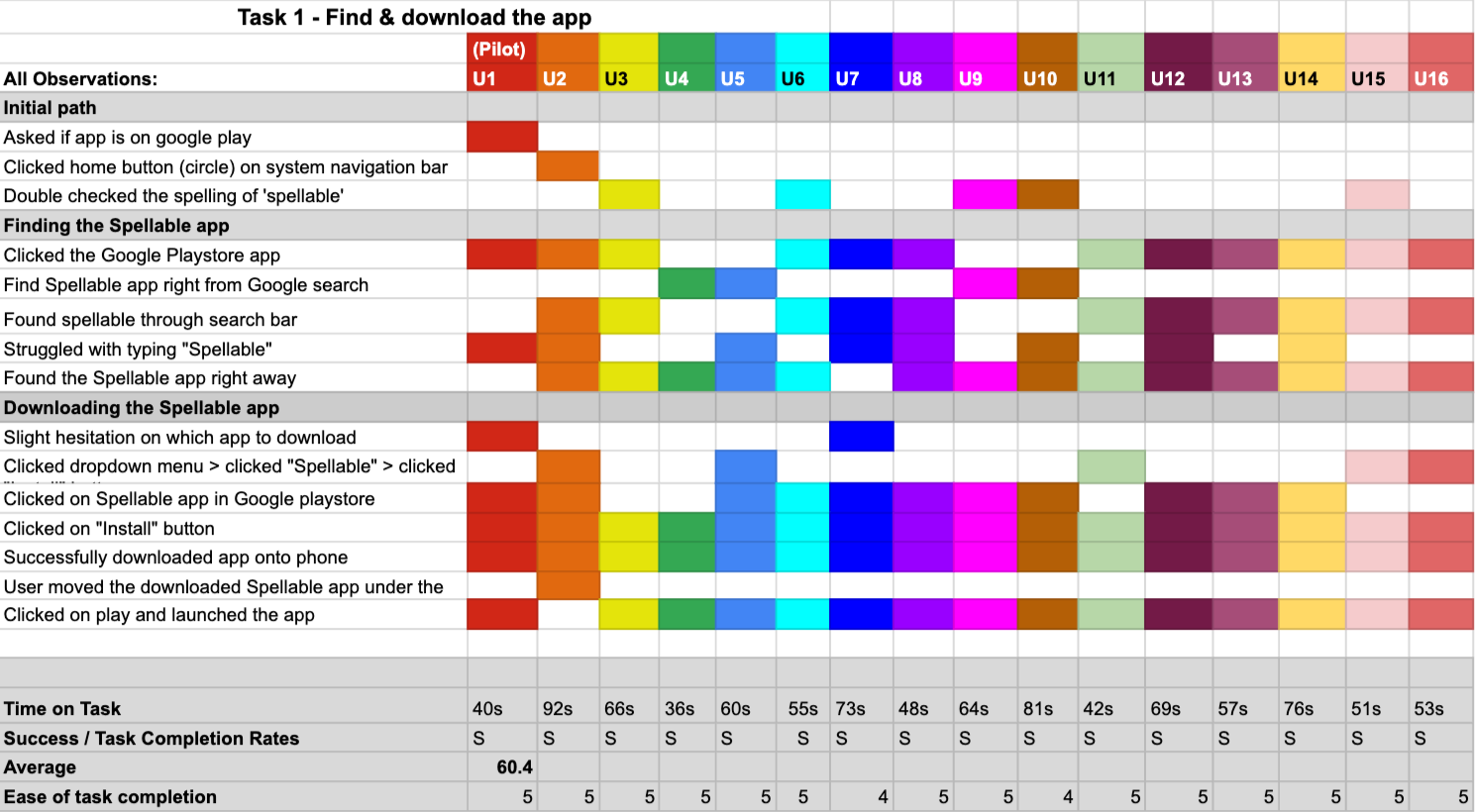
During each session, our team documented participant behaviors, feedback, and observations in a shared Rainbow Spreadsheet. Working from a shared source of evidence allowed us to compare observations across researchers and made recurring patterns and usability issues visible across all 16 sessions.
This collaborative approach helped us align on the strongest patterns in the data, and move efficiently from observations to key findings and actionable recommendations for the Spellable team.
KEY FINDINGS
Dense instructions created cognitive overload before learning began.
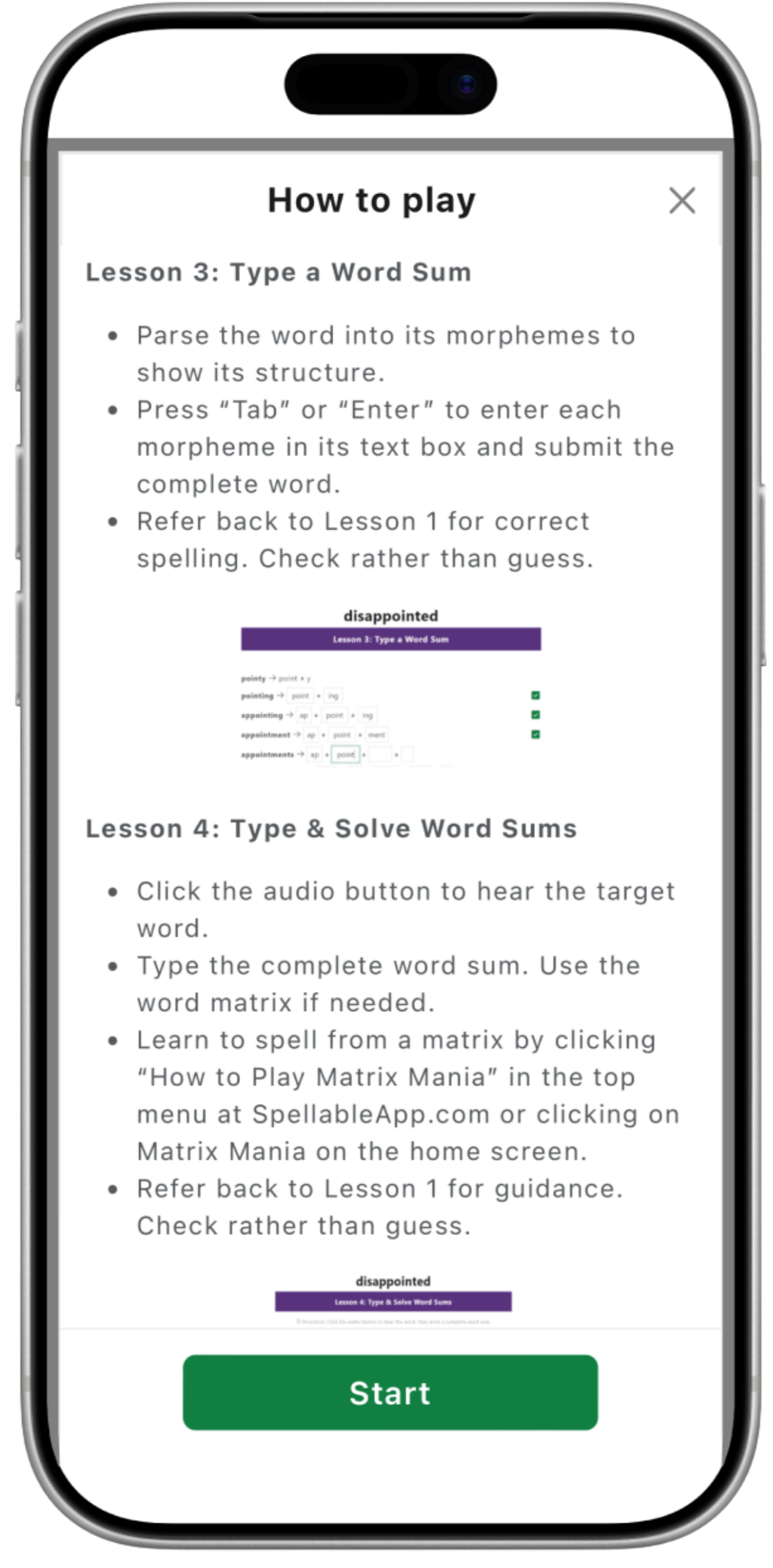
Majority of participants skimmed the instructions, finding the amount of information difficult to process and retain at once. Those who read the content in full struggled to recall the rules as they progressed, suggesting that the issue extended beyond willingness to read, it was also a matter of how much information users were asked to process.
Action Item: Introduce instruction progressively at relevant moments in the lesson, with optional audio or video guidance, to avoid heavy cognitive load.
The custom keyboard may have introduced barriers beyond spelling ability.
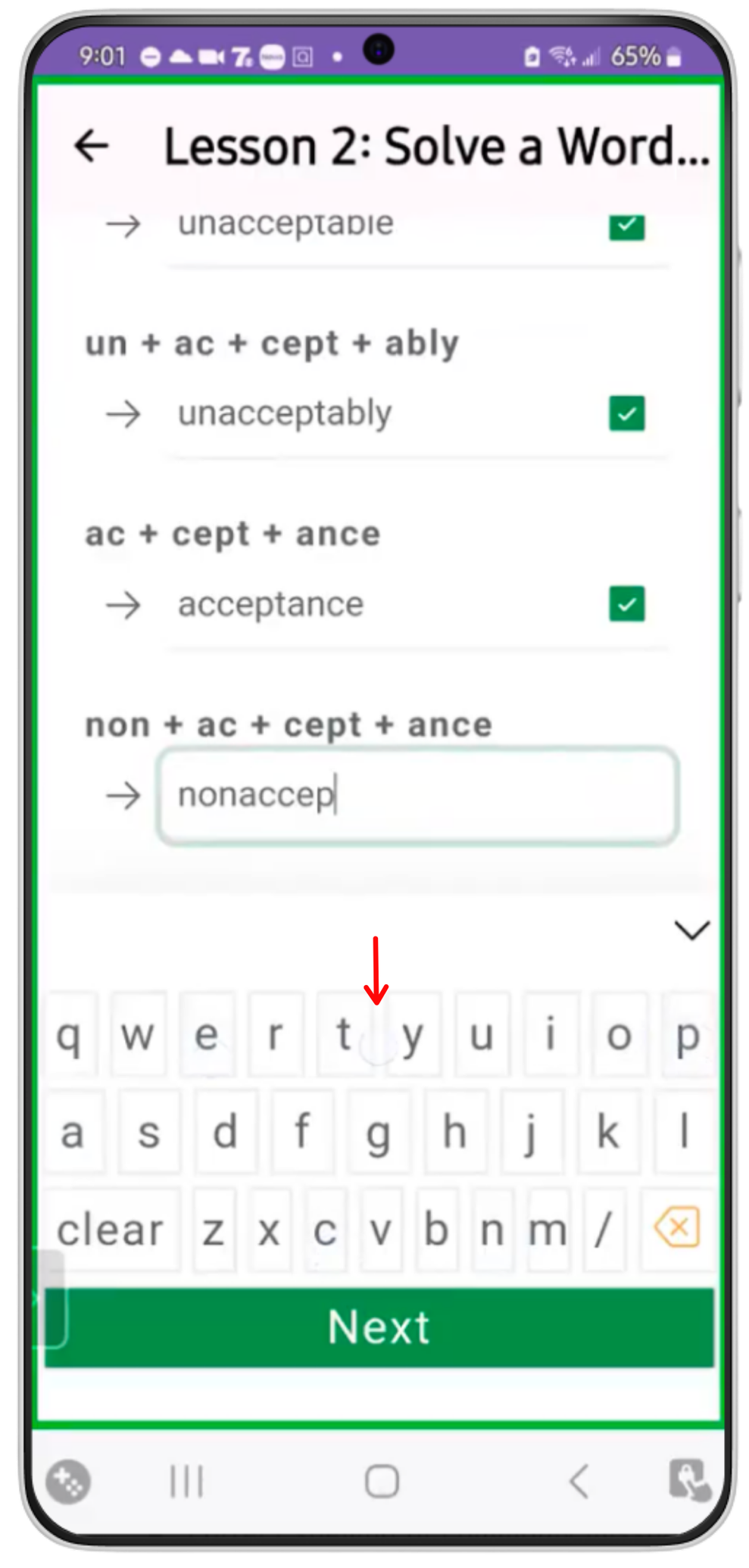
Most participants experienced friction while using the in-app keyboard, including accidental inputs, obstructed interface elements, and difficulty selecting intended keys. These patterns raised an important concern: in a spelling app, interaction errors may be mistaken for gaps in spelling knowledge.
Action Item: Evaluate and optimize the in-app keyboard against familiar Android interaction patterns and accessibility needs to reduce input-related friction.
Immediate feedback supported confidence throughout the learning experience.
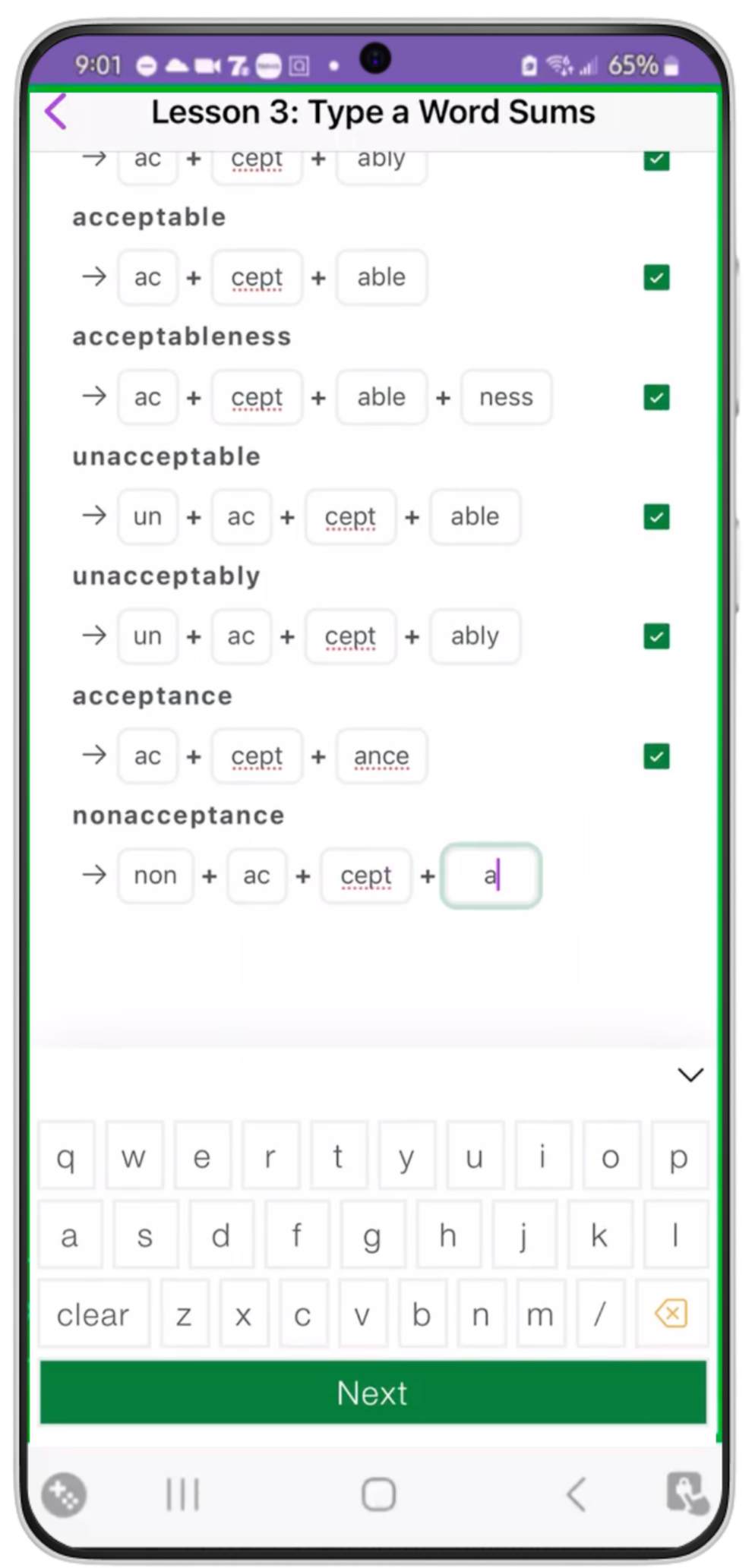
Participants responded positively to Spellable’s use of audio and visual feedback, which provided clear confirmation as they progressed through the lessons. Correct-answer cues reinforced success, while feedback on incorrect responses was generally perceived as encouraging rather than punitive.
Recommendation: Preserve and consistently apply immediate audiovisual feedback as the lesson experience evolves.
IMPACT
Our findings gave the Spellable team a clearer direction for improving the learning experience.
I translated patterns across 16 first-time user sessions into prioritized recommendations for the stakeholder. The research identified where the experience was creating unnecessary friction, while also highlighting design elements worth preserving as the product evolves.
The findings gave the team evidence to guide future decisions around instructional content, interaction design and accessibility.
REFLECTION
Real-time data capture requires intentional role division.
Our sessions required moderators to facilitate, probe, observe behavior, document observations, and track task time simultaneously. While the Rainbow Spreadsheet supported rapid synthesis across sessions, managing these responsibilities alone meant some behavioral observations and timing data had to be verified through recordings afterward.
In a future study, I would pair a lead moderator with a dedicated observer. Separating facilitation from data capture would allow the moderator to remain fully present with the participants, while improving the completeness of data collection.
Designing for different paces required more structure, not less.
The study challenged some of our assumptions about task design and reinforced the importance of consistency across a research team.
I intentionally grouped lesson completion into one broader task because I expected participants to move at different speeds and have varying levels of spelling ability. In practice, the task’s breadth sometimes created a sense of time pressure.
If I were to run the study again, I would break the lesson journey into smaller tasks and extend the session time accordingly. This would preserve differences in participants’ natural paces, while giving me a clearer observation points throughout the learning experience.